
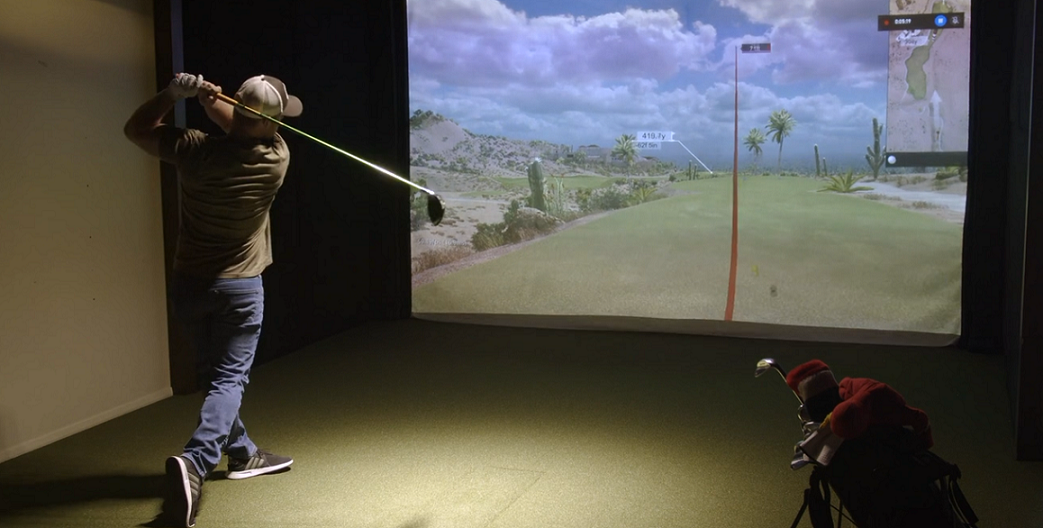
A perfect morning on a Richmond golf course is hard to beat. Still, busy schedules, unpredictable Virginia weather, and early winter sunsets can make it tough to play a full round.
Imagine stepping onto the tee at Pebble Beach, Pinehurst, or St Andrews without leaving your home.
For decades, Security Plus AV has turned spare rooms, basements, and garages into top-notch entertainment spaces. Now, we’re excited to take that to the next level for our fairway friends!
How to Design the Ultimate Indoor Golf Simulator
If you want to bring the fairway home, here’s how we use TruGolf technology to create a custom indoor golf experience.
The Space Requirements: Measure Twice, Swing Freely
Before we get into the technology, let’s look at the space you’ll need. You don’t need a huge commercial area, but you do need enough room to swing your driver safely and comfortably.
At a minimum, your room should meet the following dimensions:
- Height: You’ll need at least 9 feet, but 10 feet or more is best so you can swing with confidence.
- Width: Make sure you have at least 12 feet of space so you’re centered and clear of the walls.
- Depth: You’ll want at least 7-10 feet from the hitting mat to the impact screen. This gives the ball room to land safely and lets the tracking technology do its job.
The Brains: TruGolf Launch Monitors
A golf simulator is only as good as the data it provides. For accurate distance, ball spin, and launch angles, we use top-quality TruGolf tracking technology:
- The APOGEE (Ceiling-Mounted):This is the best option for a dedicated home setup. Since it’s mounted on the ceiling, it stays out of your way while you swing. High-speed cameras and instant playback read both ball and club data with no lag, so you don’t need special balls or club stickers for accurate results.
- The LaunchBox (Portable): If you need your space to serve multiple purposes, this compact, floor-based unit uses two high-speed cameras to track your shots. It’s easy to move when you need the room for something else.
The Visuals: Powerful Projectors & Impact Screens
For your virtual course to feel real, the visuals need to be immersive and sharp.
The Projector
Standard, ground or wall-mounted projectors don’t work well in a golf simulator because your swing would cast a big shadow on the screen. We install projectors (at least 3,000 to 4,000 lumens) overhead. This keeps the light close to the screen, giving you a bright, shadow-free, high-definition image even with the lights on.
Heavy-Duty Impact Screens
Regular projector screens can’t handle real golf balls. We use commercial-grade, tightly woven impact screens that absorb hard hits quietly and still show bright, clear images.
The Software: Travel the World with E6 CONNECT
Your simulator runs on E6 CONNECT, the industry-standard software from TruGolf. E6 gives you realistic graphics, accurate physics, and digital sound right on your screen. Play famous courses, use driving ranges and target games for practice, or connect and compete with players around the world.
Beyond Golf: The TruGolf MultiSport Suite
If you want your simulation bay to be a true entertainment destination for the entire family, you aren’t limited to just hitting the links. By integrating the TruGolf MultiSport ARCADE ecosystem, you can instantly turn your hitting bay into a full-scale sports arena using your exact same room footprint, projector, and high-impact screen.
Using a standalone, ceiling-mounted tracking enclosure packed with dual depth-tracking cameras, the system actively reads throws, kicks, and swings with pristine accuracy. The suite unlocks a massive library of 14 interactive, arcade-style sports titles, including:
- Rally Baseball & Inside Heat: Step into the batter’s box for an immersive home run derby or take the pitcher’s mound to strike out batters, complete with voice-activated pitching controls.
- Breakaway Soccer & Foot Golf: Perfect your penalty kicks with specialized target practice or chase par across four unique foot-golf courses.
- Slapshot Hockey: Fire real hockey balls past virtual goalies in fast-paced modes like Blackout and Long Shot.
- Family Night Arcades: Bring the neighborhood together for up to 8-player turn-based showdowns of Zombie Dodgeball, Bowl-A-Rama, Disc Golf, and even backyard Cornhole.
Engineered for Every Generation The best part about the MultiSport upgrade is its accessibility. You don’t have to worry about younger kids or non-golfing guests missing out on the fun. Every game features highly adjustable difficulty levels, artificial power boosts, and custom settings (like virtual bowling bumpers) to level the playing field.
Furthermore, built-in voice activation means your guests can start games, select modes, and navigate menus completely hands-free while holding a bat, football, or bean bag. It’s the ultimate way to maximize your low-voltage tech investment and keep the room active all year long.
Clean Integration and Power Management
At Security Plus AV, we do more than just install equipment. We use our low-voltage engineering skills for the whole system. We run neat, organized cables through the walls to connect your launch monitor, projector, and high-performance PC to one central spot.
We can also connect your golf simulator to your Smart Home system. With one tap on a keypad or tablet, the lights dim, the projector turns on, and your speakers play the sounds of the gallery.
Ready to Tee Off At Home?
If you have the space, we have the know-how to design, wire, and set up your dream golf room. Contact Security Plus AV today for a free home design consultation, and let’s start building your custom TruGolf setup.
Security Plus AV: Simple. Smart. Secure.
VA DCJS #11-6243